> ## Documentation Index
> Fetch the complete documentation index at: https://www.dataframer.ai/docs/llms.txt
> Use this file to discover all available pages before exploring further.

# Architecture & deployment

> Deploy DataFramer in our cloud or in your own cloud account.

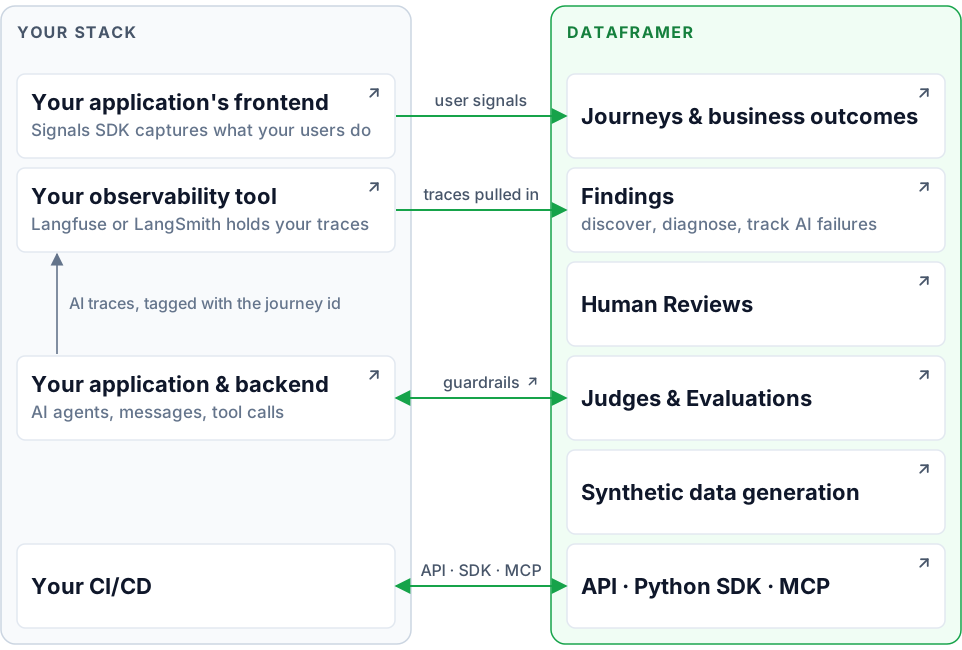
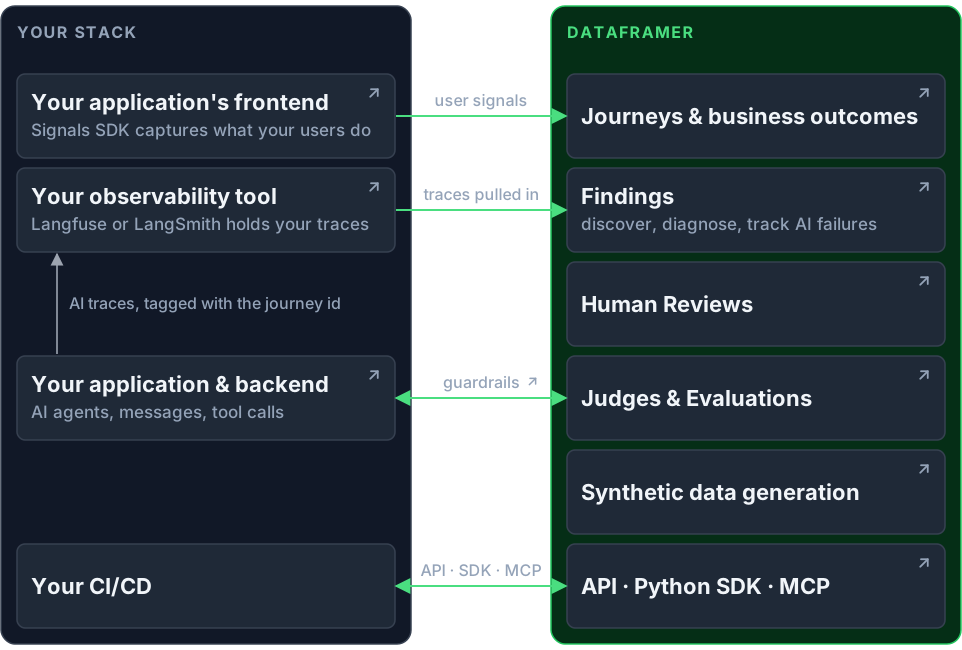
## How DataFramer connects to your stack

<div className="not-prose relative">
  <img className="block dark:hidden" src="https://mintlify.s3.us-west-1.amazonaws.com/aimonlabsinc/images/architecture/you-and-dataframer-light.svg" alt="Your stack on the left, DataFramer on the right, and the four connections between them" style={{margin: 0, width: "100%", verticalAlign: "top"}} />

  <img className="hidden dark:block" src="https://mintlify.s3.us-west-1.amazonaws.com/aimonlabsinc/images/architecture/you-and-dataframer-dark.svg" alt="Your stack on the left, DataFramer on the right, and the four connections between them" style={{margin: 0, width: "100%", verticalAlign: "top"}} />

  <a className="arch-hotspot" href="/docs/journeys/overview" aria-label="Journeys & business outcomes" style={{left: "58.94%", top: "11.38%", width: "39.29%", height: "12.92%"}} />

  <a className="arch-hotspot" href="/docs/findings/discovery-and-tracking" aria-label="Findings" style={{left: "58.94%", top: "25.85%", width: "39.29%", height: "12.92%"}} />

  <a className="arch-hotspot" href="/docs/reviews/overview" aria-label="Human Reviews" style={{left: "58.94%", top: "40.31%", width: "39.29%", height: "12.92%"}} />

  <a className="arch-hotspot" href="/docs/judges/overview" aria-label="Judges & Evaluations" style={{left: "58.94%", top: "54.77%", width: "39.29%", height: "12.92%"}} />

  <a className="arch-hotspot" href="/docs/concepts" aria-label="Synthetic data generation" style={{left: "58.94%", top: "69.23%", width: "39.29%", height: "12.92%"}} />

  <a className="arch-hotspot" href="/docs/api-and-mcp" aria-label="API · Python SDK · MCP" style={{left: "58.94%", top: "83.69%", width: "39.29%", height: "12.92%"}} />

  <a className="arch-hotspot" href="/docs/user-signals/browser-sdk" aria-label="Your application's frontend" style={{left: "1.77%", top: "11.38%", width: "39.29%", height: "12.92%"}} />

  <a className="arch-hotspot" href="/docs/connect-traces" aria-label="Your observability tool" style={{left: "1.77%", top: "25.85%", width: "39.29%", height: "12.92%"}} />

  <a className="arch-hotspot" href="/docs/user-signals/server-instrumentation" aria-label="Your application & backend" style={{left: "1.77%", top: "54.77%", width: "39.29%", height: "12.92%"}} />

  <a className="arch-hotspot" href="/docs/judges/guardrails" aria-label="guardrails" style={{left: "44.28%", top: "56.92%", width: "11.43%", height: "5.23%"}} />
</div>

## Two ways to deploy

Both run the same application. They differ in where your data is processed and stored.

### Cloud-hosted

Everything runs in DataFramer's cloud, and your data is stored there, scoped to your company. Model calls run on DataFramer credits, or on your own provider keys if you add them under **Settings → Keys**. Setup is [signing up](https://app.dataframer.ai/?screen=signup), then [connecting your traces](/docs/connect-traces); there is nothing to deploy.

### Customer-hosted

Use this when your data cannot leave your own cloud. DataFramer keeps the **control plane**: the web app, sign-in, the API, workflow orchestration, billing, and a database of metadata. You run the **data plane** in your own cloud account, deployed with our Terraform module: the workers that process your data and the storage they use.

<img className="block dark:hidden" src="https://mintcdn.com/aimonlabsinc/xrK1LwZ5ZZLSk5Rh/images/architecture/customer-hosted-light.svg?fit=max&auto=format&n=xrK1LwZ5ZZLSk5Rh&q=85&s=75c2106a3da43a841188017d3290a2f9" alt="DataFramer's control plane on the left, the data plane in your cloud account on the right; every arrow across the boundary starts on your side" width="962" height="668" data-path="images/architecture/customer-hosted-light.svg" />

<img className="hidden dark:block" src="https://mintcdn.com/aimonlabsinc/xrK1LwZ5ZZLSk5Rh/images/architecture/customer-hosted-dark.svg?fit=max&auto=format&n=xrK1LwZ5ZZLSk5Rh&q=85&s=a1e422e7f716b7357cb8a5024edda263" alt="DataFramer's control plane on the left, the data plane in your cloud account on the right; every arrow across the boundary starts on your side" width="962" height="668" data-path="images/architecture/customer-hosted-dark.svg" />

* Your content stays in your account.
* No inbound connections. Every connection that crosses the boundary starts in your account or in your browser.
* Model calls use your own provider keys.
* Same functionality as the cloud-hosted version.

To self-host the data plane, you need your own cloud account, Terraform, an LLM provider key, and a hostname with a certificate for the gateway. Choose **Customer-hosted** when you sign up. **Settings → Data Plane** then shows the values the module needs and activates the plane once it is running. [Contact us](mailto:info@dataframer.ai) to plan the rollout.